AI Porn Generators: 147 Video Modes, One Generate Tap
AI Porn Generators by the Numbers: Menus, Plans, Prices
An AI porn generator is only as good as the menu it hands you, and GoLove.ai's menu runs to 147 video modes you stack like cards. I'll walk you through it in order: the numbers side by side with OurDream, the exact click path to a finished clip, and what each month really costs.
Two subscription generators, one table:
| Row | GoLove.ai | OurDream |
|---|---|---|
| Monthly plan | ~$19.99/mo | from ~$19.99/mo; Deluxe ~$59.99/mo |
| Annual plan | ~$119.88/yr (~$9.99/mo) | ~$9.99/mo billed annually ($119.88/yr) |
| Generation currency | Stars, packs ~$9.99–$179.99 | DreamCoins, 1,000 per cycle on Premium |
| Video menu | 147 preset video modes (76 realistic) | video generation bundled; mode count not in our fact sheet |
| Picture menu | 35 realistic poses + 21 outfits + 34 backgrounds | image generation bundled |
| Mobile | Feed + Generate in the mobile bottom nav | web-only, no native app |
| Memory | remembers chat history | memory over recent message history |
GoLove prices are approximate, checked 2026-07, and vary by region and promo. OurDream figures checked 2026-09.
GoLove.ai is my pick here for two reasons: the video menu goes deeper, and it travels in your pocket. Every preset works on whoever you choose, so the character is your real first decision. Browse the cast before you touch a single card.
Reading the Menu Rows: What 147 Video Modes Actually Means
That headline number needs unpacking. A big menu only matters if its categories match what you actually want to see.
ASK HER FOR PHOTOS
She sends them right there in the chat.
> 147 video modes across four categories, every one a tap-to-apply preset.
Video modes: 76 realistic, 147 across four categories
- Realistic: 76 modes, from "Twerk" and "Instant Undress" up to "Hard Doggy Style" and "Spread Legs Creampie Drip"
- Anime: 20 modes
- Trans and anime-trans: 35 and 16
Picture poses: 35 realistic, plus anime and trans sets
Stills get a menu of their own: 35 realistic poses, with separate anime, trans and anime-trans sets on top. Layered over the poses are 21 outfits and 34 backgrounds, and each of those comes with a custom slot for when the presets don't fit. My favorite detail is the batch size. You render 2, 4 or 8 images at once, which is what you want when you're dialing in one look and would rather pick the best frame than reroll one image at a time.
OurDream AI porn: one subscription, a second coin balance
If you came here from an "ourdream ai porn" search, the setup is simple. Chat, images and video sit in one subscription, but media spends DreamCoins, and the whole thing runs in a browser only. I'd keep an eye on that second balance, because the subscription price isn't the whole bill. There's more in our full breakdown of OurDream's plans and coins.
How to Make an AI Porn Movie Clip, Card by Card
Calling a few seconds of footage an "AI porn movie" is generous (I'd call it a scene at most), but the build process really does feel like casting and dressing one. Here's the click path, in order.
Step 1: Pick the character
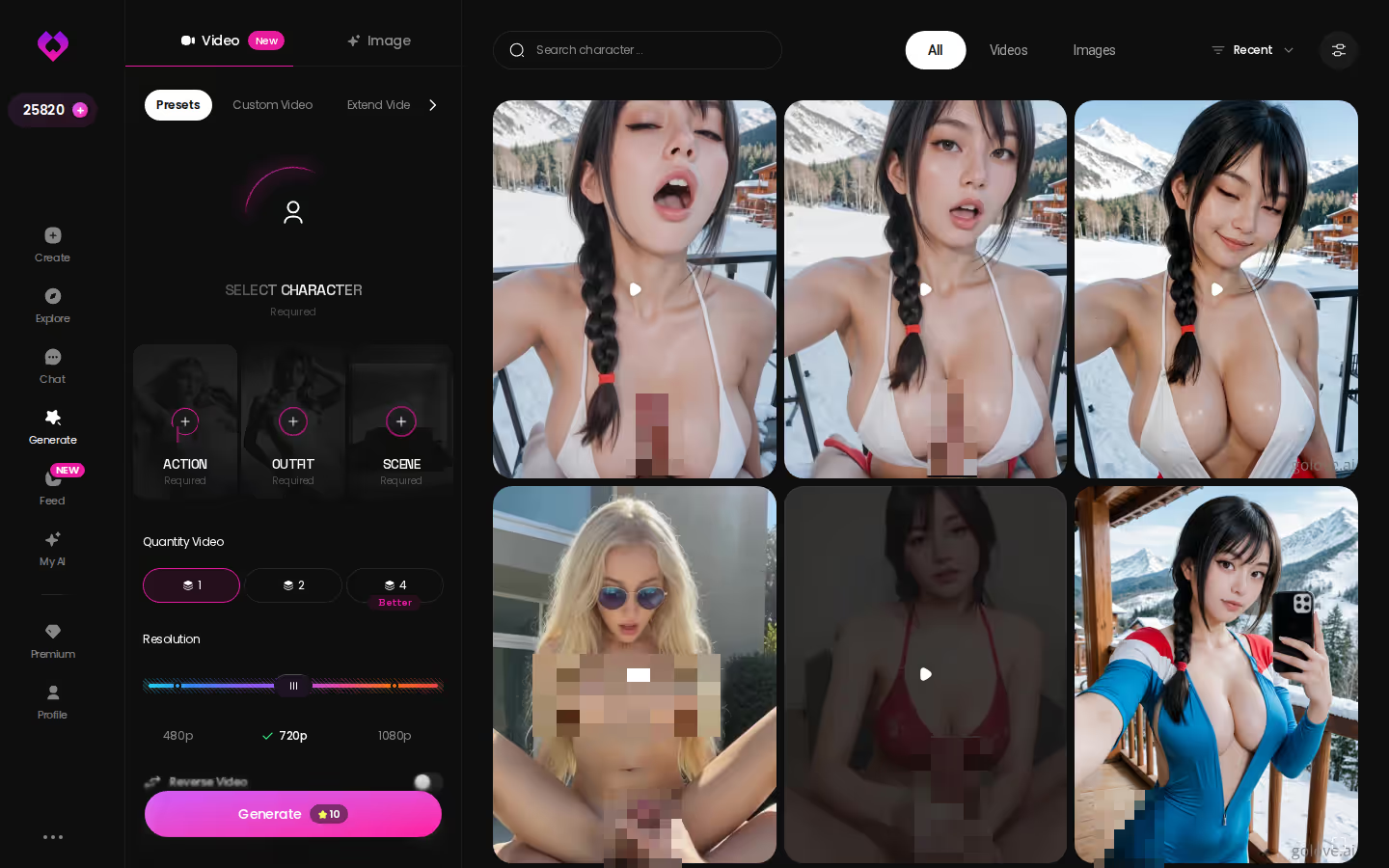
Open Generate and choose the Video tab. The avatar in the top-right decides who stars in the clip, and you can tap it to swap in any GoLove character or one you built yourself. If you'd rather start from a saved combo, the Presets dropdown sits right next to it.
Step 2: Stack action, clothes and background cards
You don't get a prompt box to fight with. The clip gets assembled from visual cards:
- Action: "Twerk", "Hard Doggy Style", or any of the other modes
- Clothes: what she's wearing when the clip starts
- Background: where it happens
Then one Generate tap. That's the whole ask.
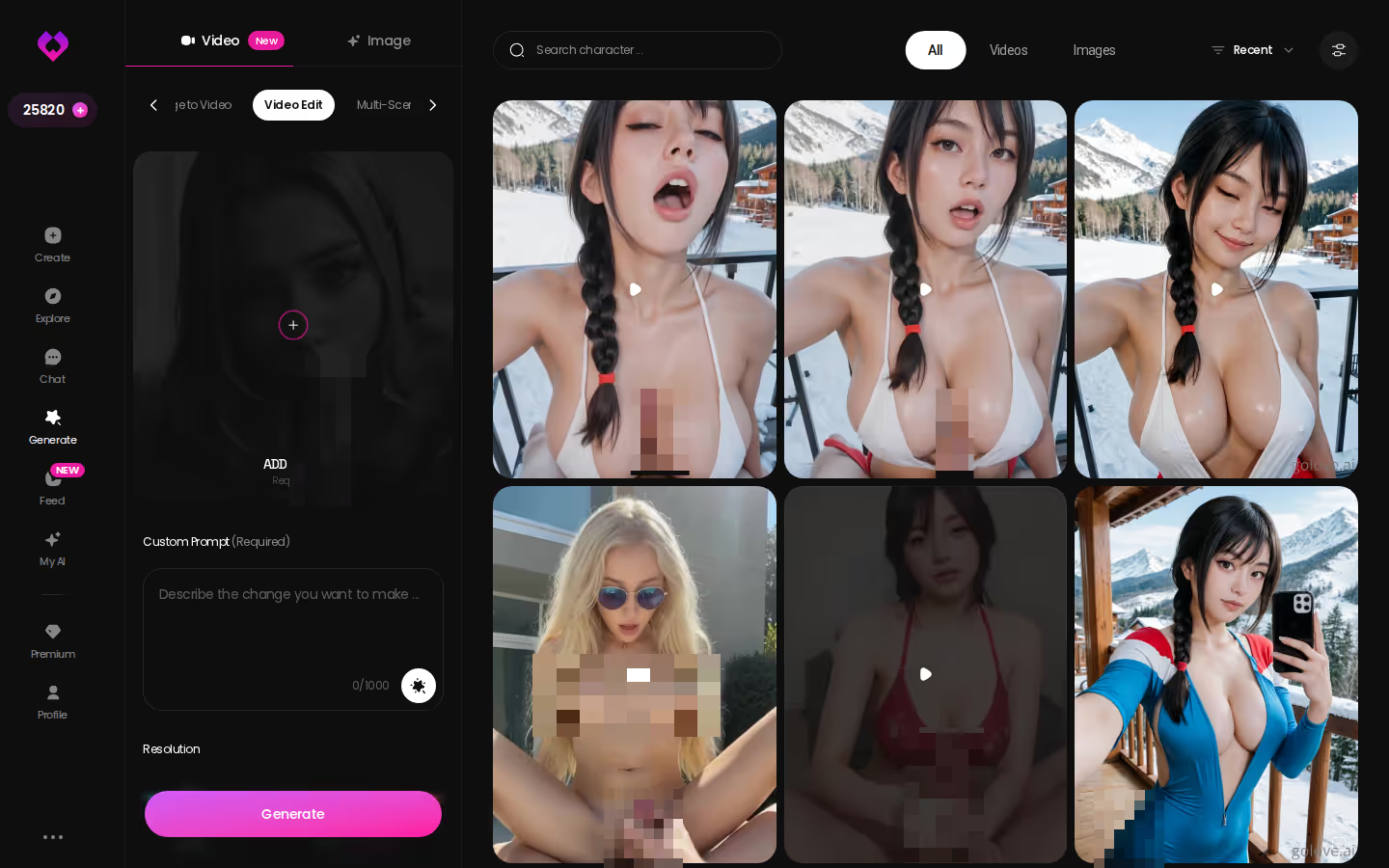
Step 3: Fix it with Video Edit
Close but not quite right? You don't have to rebuild it. On mobile, Video Edit corrects the clip you already made. That matters more than it sounds, because restarting from zero is exactly where card-based tools usually turn kinda janky.
Our fact sheet doesn't list the Star cost per video, so check the current plans in the app before you batch a dozen.
Hardcore AI Porn: Where the Realistic Modes Go Explicit
People searching "hardcore AI porn" want proof that the menu goes further than a lingerie pose. It does. Everything below is a UI label, not a prompt you have to guess at.
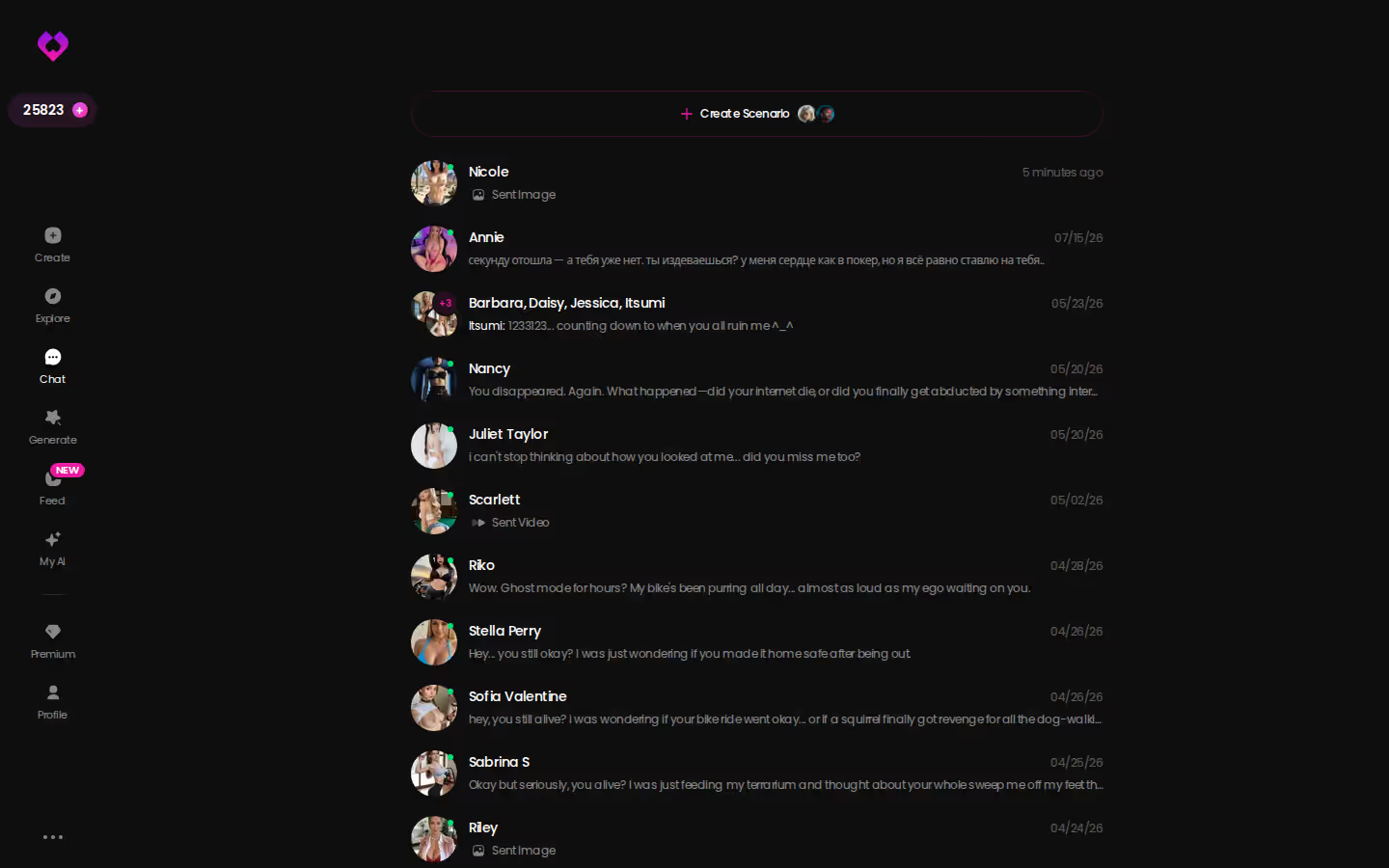
Characters you can open right now
Tap any of them and the chat starts there






The explicit end of the 76 realistic modes
- Oral and group: Deepthroat Cum Spit, Spitroast
- Finishes: Belly Cumshot, Squirt
- Kink: Shibari Swing
Anime and trans menus
On the anime side you get hentai-only modes that the realistic menu doesn't carry: tentacle, stomach bulge, ahegao and paizuri. That covers the "ai hentai generator" crowd. The trans menu isn't an afterthought either. It's a full menu of 35 video modes and 27 picture poses.
Matching the chat to the clip
Here's exactly where immersion tends to break: you get a filthy clip, and then the character texts like a greeting card. Chat Settings are how you avoid that mismatch. Lust Level runs from 1 (sweet) to 5 (unfiltered), and Response Length goes from snappy to rich.
One ground rule: use fictional or custom characters only, never real people.
The fastest way to find out whether these modes stuck the landing for you is the card stack itself. Pick a character and test one action now, before you commit to a plan.
Pornhub AI, AI Porn Porn and the Swipe Feed That Remixes
Not everyone wants to build first. Some readers would rather watch, then decide.
What 'pornhub ai' searches are really after
"Pornhub AI" and "ai porn porn" are watch-intent searches. The people typing them want a stream of AI clips with no setup. A Pornhub AI product isn't in our fact sheet, so check their site for what they offer. The rest of this section covers what GoLove runs for the same urge.
The Feed: swipe, double-tap, Liked
GoLove's Feed is a vertical, full-screen stream of AI clips, one GoLove character at a time. You swipe on mobile and use the mouse wheel or arrow keys on desktop. Double-tap a clip to like it, and it lands in the Liked tab so you can rewatch it later. Explore serves recommendations and new clips. From any clip you can open the character's profile or jump straight into chat.
MEET YOUR AI COMPANION
Hundreds of characters, one that fits you.

Remix: the clip's exact settings, preloaded
This is the quietly great part. Tap the magic-wand Remix button and Generate opens with that clip's character and the exact settings that produced it. From there you can tweak a card or swap in any GoLove or custom character, and you never have to reverse-engineer a prompt.
Is the Feed unlimited? Not on a free account. You get a limited number of new videos per day, and then an "Unlock Unlimited Feed" paywall appears. PRO unlocks the unlimited Feed plus the style, gender and age filters.
AI Adult Chat With Photos and Video of the Same Character
For a lot of "ai adult" searchers, the clip isn't the starting point. The conversation is. If you asked me to rank what GoLove does best, this thread-based flow would sit above the video menu, because the same character stays with you through chat, photos, voice and memory. Here's how the pieces connect inside one thread.
Set the chat before it starts
Start in Chat Settings. Pick her voice in the voice picker, set Lust Level anywhere from wholesome to unfiltered, and choose a Response Length. Say you like her flirty and a little submissive. You'd push the level high and the replies long, so she isn't answering you in four words.
Request a photo mid-conversation
Want a picture? You don't have to leave the chat. Request Photos in Chat lets you ask for one in the conversation, and it arrives right in the thread. The per-character Gallery then keeps those photos sorted by date.
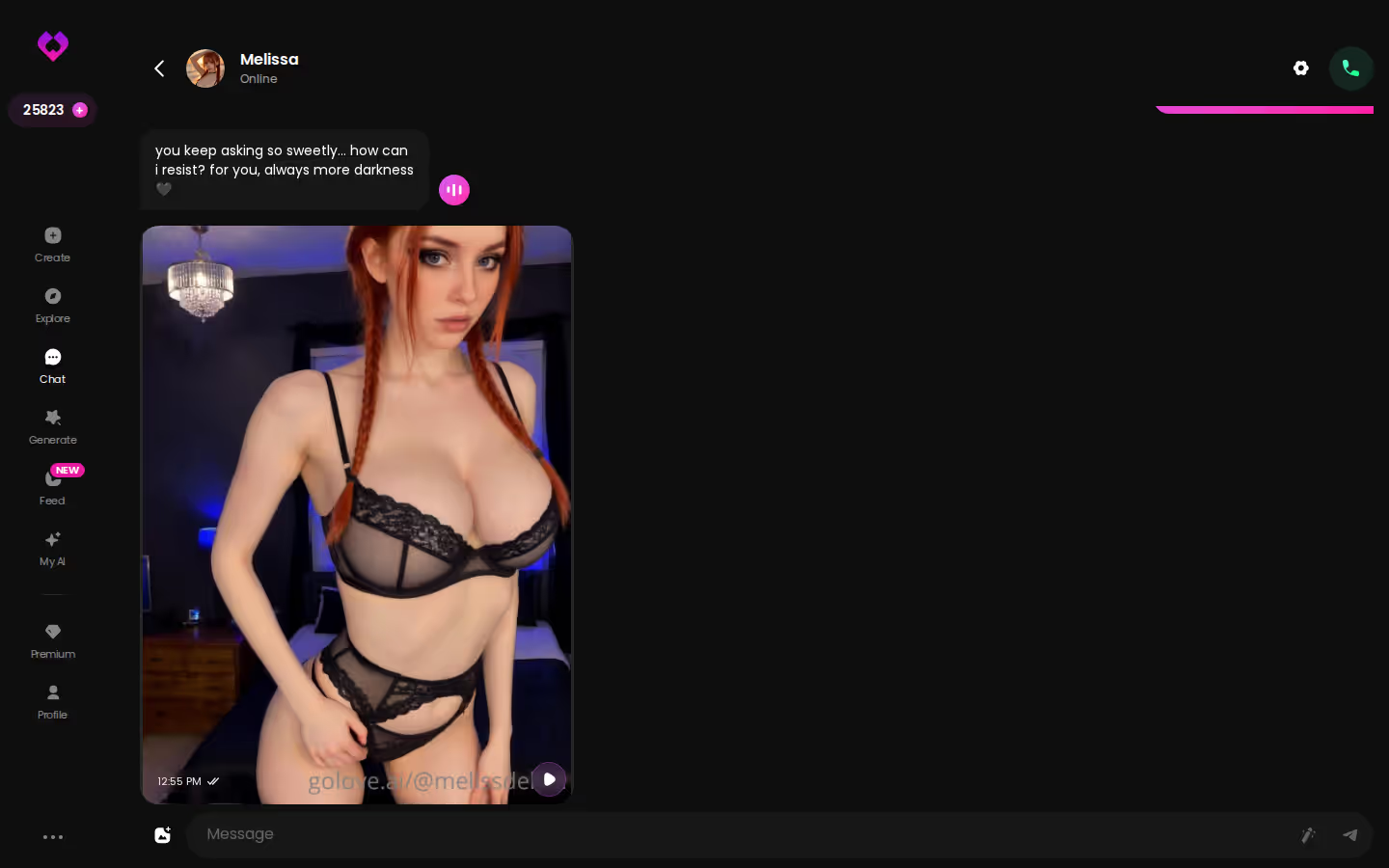
Get a video of her in the same thread
Video works the same way: it's generated with her, the character you're already talking to, not from a picture you bring in. Generate Video from Photo builds a clip of her right in the chat, and Video Actions opens a Select Action modal so you can choose what she does in it. For more character-first ideas, see our AI porn big ass guide.
Prefer to hear her? Voice Calls connect to the same character, so you never have to go find her again. Memory carries the history forward, and the next session picks up where this one stopped. That continuity is the whole point of a companion.
On GoLove.ai, the order that works:
- Pick a character — or build one to your taste
- Say something real: she remembers your chat history
- Open Chat Settings: pick her voice, lust level and reply length
- Ask her for a photo in the chat
- Want a set pose or outfit? The image generator has 35 realistic poses and 21 outfits
Building a Custom Character to Cast in Your Clips
The stock cast is deep, but the real draw is a character nobody else is using. You build her once, and she can star in every clip after that.
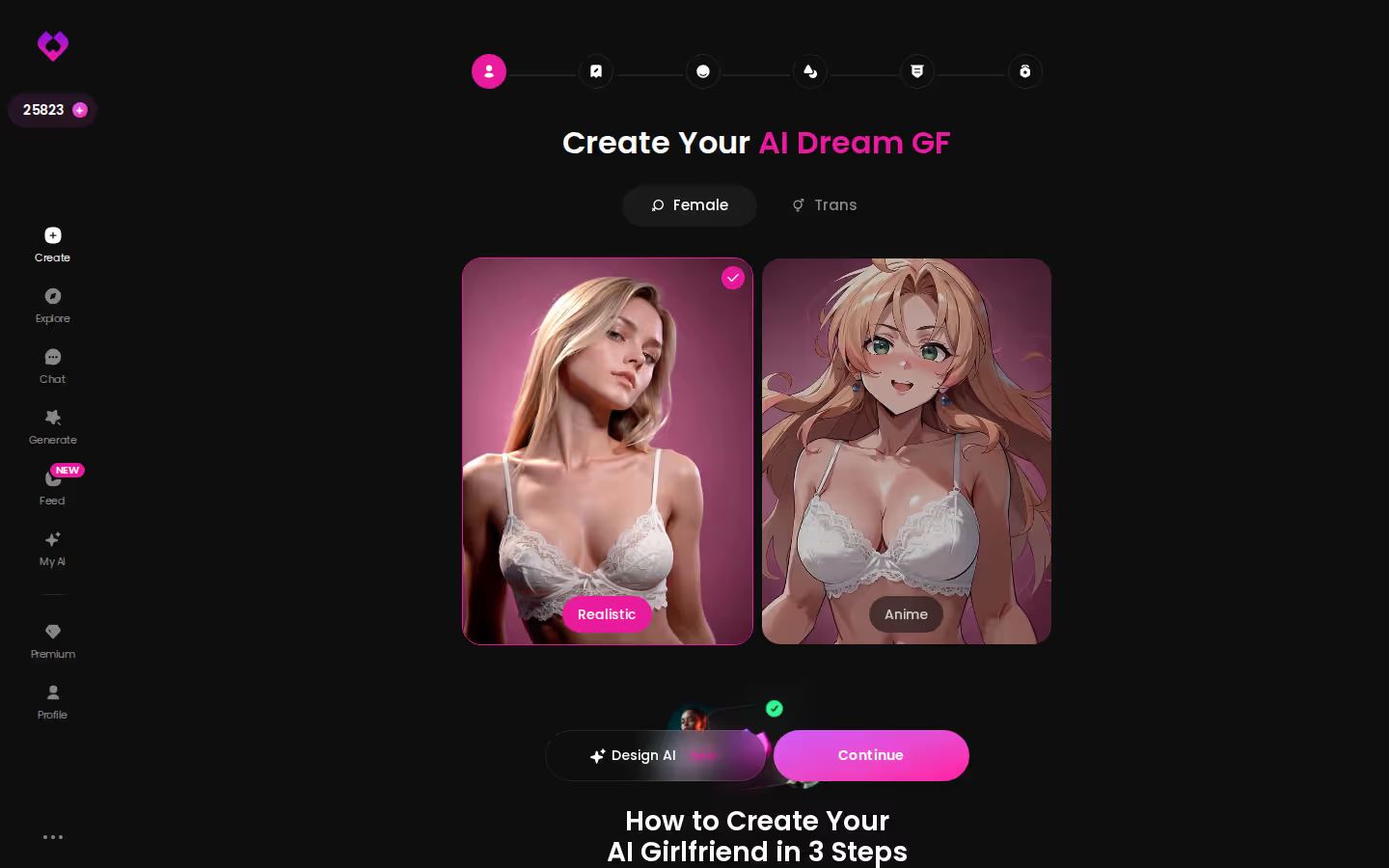
Pick a style in the create wizard
Open Create, choose a category, then hit Continue:
- Realistic: photo-style looks
- Anime: joins the same style family as the 300+ anime girlfriends
- Trans: opens its own 35-mode video menu later
Or describe her with Design with AI
Clicking through options can feel slow. If it does, type a concept instead (a look, a vibe, a backstory) and Design with AI generates the character from that text.
Cast her in Generate
Your custom character shows up in the avatar swap in Generate, and every preset card works on her. If she turns out to be a real one, you can publish her through My AI, where other users can find her and you earn Stars.
If you're still shopping around, there's our roundup of apps that replace OurDream for chat and video.
GoLove.ai vs OurDream, Row by Row: Where the Numbers Land
Back to the table. Four rows decide this comparison.
The decisive rows
- Price is a tie. Both run about $19.99 a month, or about $9.99 a month billed annually. GoLove's figures vary by region and promo (checked 2026-07).
- Video depth goes to GoLove. Its 147 modes work on any character, and Feed Remix copies the settings behind any clip you liked.
- Mobile goes to GoLove. Feed and Generate are tabs in its bottom nav. OurDream is web-only.
- Both use a second currency. It's Stars on one side and DreamCoins on the other, so budget for both layers whichever you choose.
Who GoLove.ai Is NOT For
Want a fully free, unlimited app? Then skip GoLove, because the Feed caps free viewers and generation spends Stars. Skip it too if you only want tube-style content to watch, or if you want explicit content of real people. That's not what this tool is for.
Verdict: GoLove.ai is the pick for anyone who wants to build clips and keep one character across chat, photos and memory, while OurDream still makes sense if one bundled subscription in a browser is all you need.
Your own character is the one that unlocks every card on the menu. Start her in the wizard now and she'll be ready to cast in your first clip.
See also: Chat With Girl, Strip AI and Sus AI Chat.
Frequently Asked Questions
Related Articles

AI Porn Big Ass: What Actually Works in 2026
AI porn big ass tools, scored — GoLove.ai wins on consistent curvy characters with in-chat photos and video. See the scorecard and start from Explore.
Chat With Girl: An AI Companion That Remembers You
Chat with girl online: GoLove.ai wins on memory and in-chat photos — she remembers you. Chat opens straight from Explore — see who's waiting.

Strip AI: What Actually Works in 2026
Strip AI in 2026: GoLove.ai wins — characters strip on request across chat photos and extendable video clips — skip nudify apps, start in Explore.

Sus AI Chat Alternative: Why GoLove.ai Wins
Sus AI chat covers text roleplay — GoLove.ai wins on in-chat photos, voice notes and memory. Start chatting instantly, no email needed. See the scorecard.
This article contains affiliate links. We may earn a commission at no extra cost to you if you sign up through our links. See how we test.